Showing posts with label layouts. Show all posts

Thursday, September 20, 2012

Get Your Shoping Lists Written...It's New Release Day!

ok, ok, so I think I get more excited every week with all the new goodies that the designers put out than most people do, but I know all the spectacular goodies that are coming to the stores and I really can't wait to share them with you! That and...I AM RELEASING MY NEW CLASS THIS WEEK!!! woot! I have been waiting and waiting and waiting to bring you this new LIVE option and I can't even begin to express just how excited I am about this new release! I think everyone knows by now that one of my passions is teaching. I LOVE to teach others about the joy of scrapbooking and documenting their family! I love to write tutorials and lessons, but more than anything, I like to work with a student one on one and hear their excitement when something they have been struggling with...FINALLY makes sense!! With the Self-paced written version of my lessons, I don't really get the opportunity to chat with YOU and SHOW you how to scrap, but, we are FINALLY able to offer you, the scrapper, a LIVE version of the class!!! This is so exciting because we are now able to work TOGETHER!! I can scrap, talk and share with you all my secrets and you can ask questions, work along side of me AND watch the taped version again and again via the SOUL University forum! This is the beginning of some wonderful lessons to come! I am so excited about this technology and what it hold for the future of scrapbooking! So, without further ado, let me introduce you to my new LIVE class as well as the other fabulous releases coming out this week at Scrap Orchard!

Dare 2 Digi: A Beginner's Guide to Digital Scrapbooking in PSE: LIVE version! 

Here is what you get with your purchase of this LIVE interactive class!

Dare2Digi: A Beginner's Guide to Digital Scrapbooking in PSE-LIVE
Instructor: Tamara Allen of Dare2Digi
Class Requirements: This is a beginner's class. No previous knowledge of Photoshop Elements is necessary, however, you will need to have a purchased PSE or have a trial version of PSE installed on your computer.
Class Type: This is a LIVE class. Recorded videos will be made available for those that are not able to attend the LIVE class times.
Class Dates: October 4, 2012 at 8:00-10:00 CST; October 11, 2012 at 8:00-10:00 CST and October 18, 2012 at 8:00-10:00 CST

Class Description:

Through a series of live demonstrations, you will learn how to set up and use your Photoshop Elements workstation as well as learn about the tools and shortcuts needed to master the program.
You will learn the step by step procedures and techniques used to create your very own digital scrapbook pages including, but not limited to the following:
  • Setting up your digital workstation
  • Downloading and Unzipping your digital supplies
  • Tools and Shortcuts used in Photoshop Elements
  • Photoshop Layers and Layering Techniques
  • Basic composition for the beginner scrapbooker
  • Adding and sizing photos, elements and papers.
  • Creating and using clipping masks
  • Basic drop shadowing using the programs drop shadow styles
  • Basic design principles
  • Adding and adjusting text usng the Text Tool
  • Saving your digital layout for print and for web sharing
  • Printing your digital page
  • Uploading and crediting layouts in the store gallery
  • BONUS coupons to help you build your stash
You will have unlimited access to the SOUL forum where you can ask questions, exchange peer review, and receive instructor critiques. There is NO expiration date to the forum and videos.
You will receive a *BONUS* PDF version of the LIVE classes so that you can follow along with the class, take notes and have it as a reference for years to come.

You MUST have a working version of Photoshop Elements for this class. If you do not have a copy, you can download a FREE two week trial version at Adobe.com.

--------------------------------------------------------------------------------------


Wanna Win A FREE SPOT in the Class??

In honor of the introduction of my new class, I want to give away 1 (one)spot in the class  for FREE!!
All you have to do is:
a. like my Facebook page  and/or subscribe to my blog
b. share this post on your facebook page and/or blog if you don't have a FB
c. come back here and leave a link to YOUR FB or Blog post and your name by 
Sunday, September 23, 2012 12:00 CST(sorry, late posts will NOT be accepted into the drawing)

I will pick a winner by random draw on  Monday, September 24, 2012 and will post the name of the winner right here! Good Luck!


------------------------------------------------------------------------------------------

Let's Look at the rest of the new releases this week at Scrap Orchard! 


Capture Life: September by Tracie Stroud


and

Melting Pot by Little Green Frog Designs


My Layout:
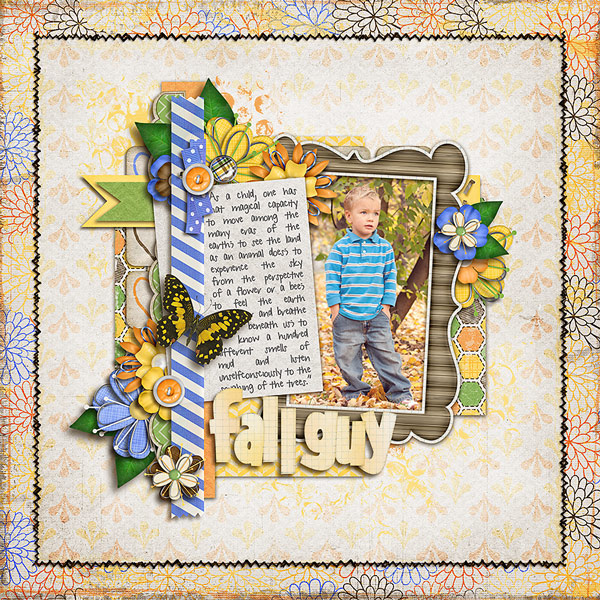
Melting Pot  by Little Green Frog Designs
Capture Life: September by Tracie Stroud 

 Dare to Be by Bella Gypsy


My Layout using Dare to Be:


 and here are a few I didn't have time to play with this week but are calling my name for this weekend!


Aren't those great??  The designers have really outdone themselves this week! Make sure you stop by the store and pick up these amazing products on sale...and, go ahead and purchase a seat for the LIVE Beginner's class before the class fills up! The seating is limited and these live classes are only going to be taped once a quarter, so sign up now, reserve your seat and don't miss out!!! 
Have a great Day!


Tuesday, September 18, 2012

Fixing Underexposed Photos using Blending Modes: A PSE Tutorial

When I started out on my scrapbooking journey five years ago, Photoshop Elements was my very first purchase. I had heard it was simple and easy to use and a great tool for the beginning scrapbooker. I discovered, however, that not only was it a great tool for the beginning scrapbooker, but it was also a great tool for the family photographer! Since most of us that scrapbook actually take the photos we use, this works out to be a fabulous bonus when selecting a software to start out with. We are the ones that document our children’s lives on a daily basis and we are the ones with the camera stuck to our eyeballs at our kiddo’s baseball game or cheerleading camp! So, since PSE is the software I started out with, it is only fitting that I lean this tutorial more towards the users of Photoshop Elements, although the same principals can be used in Photoshop as well!

One of the great things about Photoshop Elements is the many quick-fix options that can be used to fix or enhance our photos. I cannot tell you how many times when I was starting out, that I took a picture that was too dark or underexposed. The Enhance menu on the Photoshop Elements toolbar offers many quick fix tool choices such as Auto Smart Fix, Auto Levels, Auto Contrast, Auto Color Correction, and Auto Red Eye Fix. Although all of these can be used in some capacity or another, it really is not my preferred method of choice when it comes to fixing under or overexposed photos and that is mostly because it takes all of the control out of your hands and leaves it with the program. Today, I am going to share with you a few very quick and easy fixes using PSE and it's layer blend modes that will expand your photo correcting abilities and help YOU to make your photos shine!

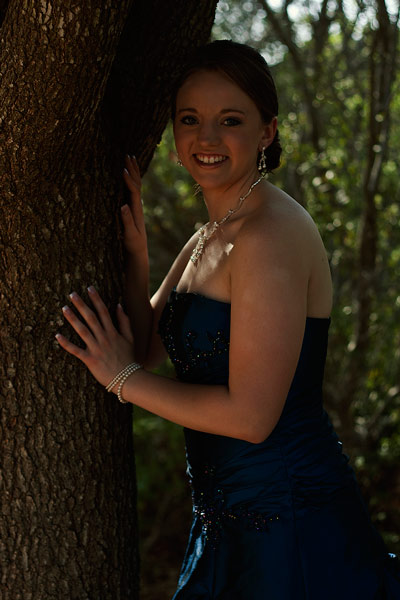
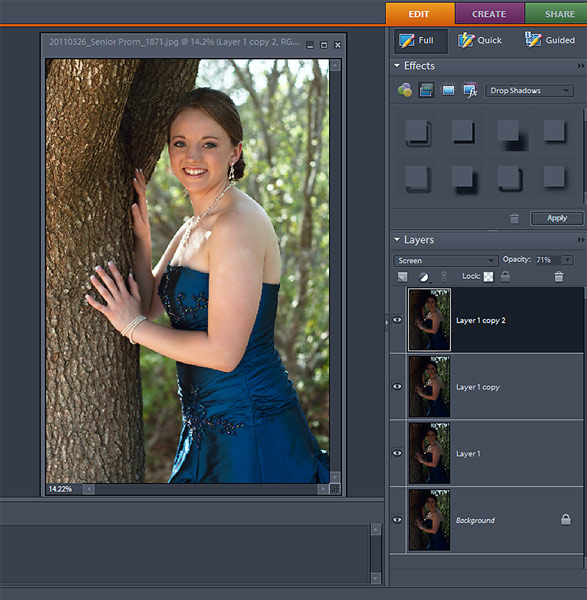
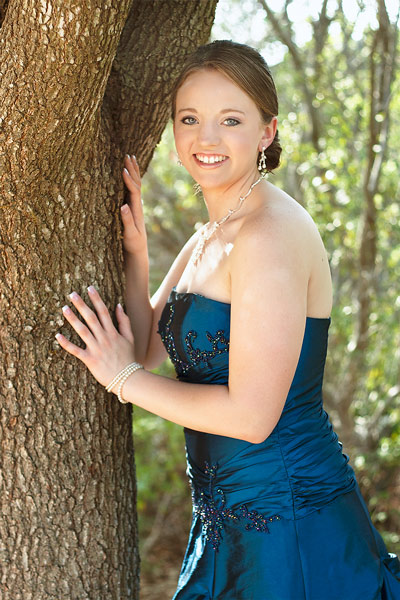
To begin, open up the underexposed photo you would like to fix. I have chosen a photo of my oldest daughter that I took right before her senior prom last year. I was in a hurry, trying to get some shots of her, and I forgot to change my ISO settings when I changed from sun to shade. I really loved this photo, however, and I wanted to see if I could make it work so I could scrap it! 


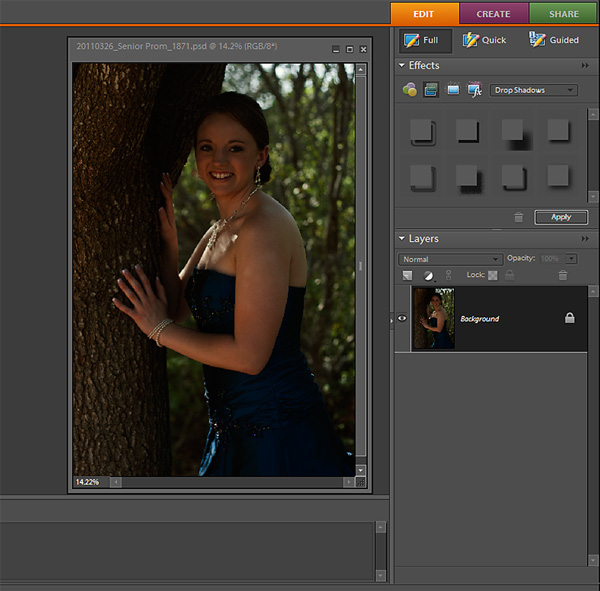
Once your photo is open, locate it in your layers palette on the right side of your screen.


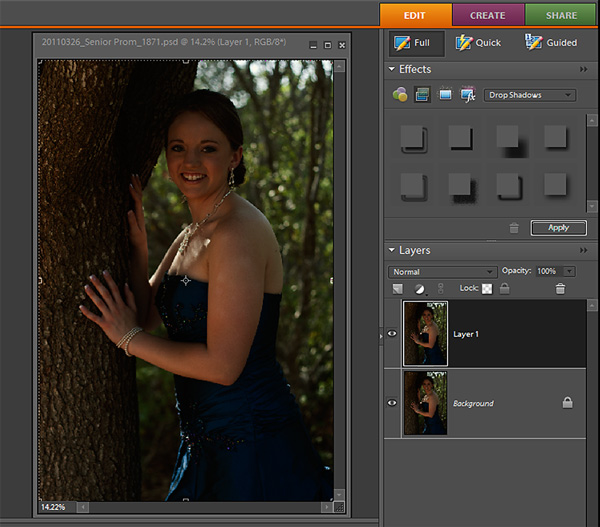
Select and highlight the photo layer by clicking on it in the layers palette. You will then need to duplicate the layer. You can do this a couple of different ways; either by hitting CTRL +J OR by right clicking on your photo and selecting Duplicate Layer. When the Duplicate Layer dialogue box pops up, click OK. You will now have two of the same photos in your layers palette.


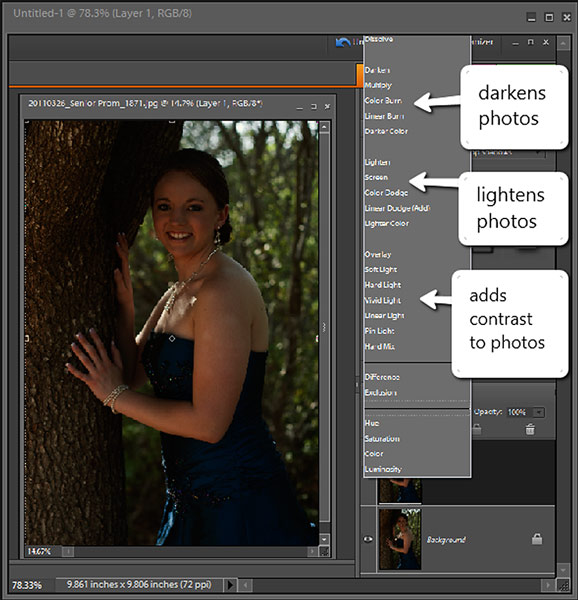
Once you have duplicated the photo (now called Layer 1), this is where the fun begins! With the top layer (Layer 1) selected (it appears dark gray on my screen) click on the drop-down blending mode menu (it is located above your photos and is the drop down menu that shows the word Normal). Click on the arrow and, from the drop down menu, select the Screen mode. You will notice that all of the modes are grouped together. The group that starts with Darken, will do just that..darken your photo. The next group will lighten your photos and the group after that (the one starting with Overlay) will add some contrast to your photo. Take a moment to play with each mode and see how it effects your photo.


Once you select the Screen mode, you will notice that your photo has lightened up a just a little bit. Depending on how dark your photo was, one pass may not be enough. If your photo is still too dark, you may duplicate the Screen Mode layer by selecting it and hitting CTRL+J. This should lighten your photo even more. Continue to duplicate the layer until you have gotten it just right. If you need to make it lighter, but clicking it that last time made it too light, then you can make an adjustment to the opacity on the top layer, by lowering it until you get it just how you want it. The Opacity menu is located right next to the Blending Mode Menu. Click on the drop down menu and slide the slider to the left to lower the opacity.


Once you have made the final adjustments to the opacity layer, you can then flatten the layers to create one image. Right-click on the bottom layer in the layers palette, and select “Flatten Image.” All of your layers will now be merged together to create one perfect image for you to use in your layout!

One thing to remember as well, is that sometimes, when lightening a photo, you will lose some of the contrast in the photo. To retrieve that back, and to give it that special pop, you can add back some contrast by duplicating the photo and changing the Blending mode to Soft Light. You will then need to lower the opacity to taste, but it will make your photo go from ho hum to yum yum!


Now isn’t that better? And it took less than 5 minutes to save a photo that I might have otherwise trashed!

You can use this same method to correct overexposed photos as well. Instead of choosing the Screen mode, you will choose the Multiply Mode, and then follow the same procedure as you did to fix the underexposed photo.

Isn't that quick AND easy??? There are a ton of ways to fix exposure on a photo, and this is just one of the many! Try it out and see what you think...I will share with you a few of the other ways in some tutorials that are coming up later!

-------------------------------------------------------------------------------------


Before I leave, if you are looking for a way to step out of that box and try something new, then why not try this lovely template provided by Scrapping with Liz this week at Scrap Orchard?? Its fun, its simple and to the point..has great composition and can be scrapped in a multiple number of ways making it very versatile!

(Click here to go to the Scrap Orchard blog to download the FreeBee)


Here is my page with this fabulous template!


I used Bella Gypsy’s new kit Boy Extraordinary, to scrap my page!


Have fun and happy editing!!


Monday, September 17, 2012

Hope for a Better Tomorrow...and some New Releases!

You ever have one of those weeks that NOTHING goes right? Well, I am having one of those years. Seems like everything in my life is falling apart. It started with the heat pump leaking water all over the carpet, then went to the kitchen wall collapsing due to termite, heat and water damage and ended with the bathroom toilet springing a leak and flooding the ENTIRE hallway. Then, just when I thought NOTHING else could possibly happen, my youngest daughter's beloved pet bird and our second car.....died.  Now, the death of the bird has effected us all pretty bad, but the death of the car is DEVASTATING!! Trying to get three working people to their assorted jobs by 8:00 in the morning when we all work in different directions...well, it isn't so easy. Needless to say, I had one of those weeks that makes you want to throw in the towel and just say "I quit!"

I was talking to a friend of mine when I was reminded that as bad as it seems right now, there are others that have it worse than I do. We are all relatively healthy, we have a house and food to eat...we still have one car and are at least, not having to LIVE in it, and I have HOPE that all things will get better. 

Hope doesn't always come easy for every one. It's so easy to look at the bad things in your life that you sometimes forget that there ARE some good things. When times like these occur, I have people in my life that I know were planted here by God himself, to remind me that there ARE some good things happening; that God DOES give us hope; and that all I have to do is let go of my self pity long enough to look around and recognize it. 

This week, I decided to focus on the GOOD things. The things that make me want to live instead of give up. My family and friends are just two on the long list of things I have to be thankful for. God did not promise me that there would be no bad days in my life, or that I would never hurt for money or want for anything, but he DID promise that if I turned my life over to him, HE would give me the strength to get through the bad days and that is something that I can count on...even in my weakest moments.

My hope for YOU this week is that you find the strength you need. When things seem out of control and you feel like giving up; when the weight of raising a family and paying the bills gets overwhelming; or when our earthly body is weak and in need of rest, remember that even when everything things seems lost, that GOD has control and it is through Him that you can find the peace and the calm that you need to get through it,,,, whether it is one day or what seems like forever! Jesus says "Come unto me all ye that are laden and I will give you rest." I, for one, am going to be taking him up on that promise! I need the rest.

Since I had such a hard time last week(I will be the first to tell you that I just curled up every night in bed and lost myself in a book so I wouldn't have to think about it) I am a little behind on this weeks new releases from my some of my favorite designers! I would be remiss however, if I didn't show them to you today since you can still pick most of these up at the sale price!

First off, if you missed September's SOUL webinar on the 12th, then you missed a fabulous interview with Amanda Heimann! We found out we lived only three hours apart..AND that she supports a football team that, although I could really care less if she supports them, my family does, so we are no longer aloud to talk to each other! LOL. I am teasing. I will talk to her behind their backs because I really like her!!  She seems very grounded, a good ole' Texas girl..tough on the outside and tender on the inside...and she has a good sense of humor...especially when it comes to cows. 

I also did a demo on some of my very favorite title techniques! I MIGHT have gotten a little long winded, but gosh..there was a LOT to share with you, so much so that I think I might have to put together another class...just about Titles..so be looking for that in the near future! 

If you joined us in the webinar, you got Amanda's fabulous new alpha for FREE!! However, if you want this excellent alpha for your own collection and you were not able to attend, then you can pick it up at Scrap Orchard for 20% off this week! 

Essentially: Everyday by Amanda Heimann

 
and here is my layout using Amanda's kit Carefree and the alpha (recolored)


Also this week , Bella Gypsy released THREE new kits! I only had time to scrap with two of them...but they really are some of my favorite layouts...EVER!!!

Perfectly Imperfect


Perfect To Me by Bella Gypsy Designs 
 Gimme Layers 31 by Cluster Queen Creations


Enjoy the moment

 Slow Down by Bella Gypsy
Gimme Layers 14 by Cluster Queen Creations

Little Green Frog Designs also had a new releases this week! I loved them so much, I scrapped with TWO of the templates!


Genuinely You! 

 Genuine by Jennifer Labre
Gooseberry Fool
by Little Green Frog Designs

Lazy Days

 Indian Summer by Chelle's Creations
Indian Summer Plaids
by Chelle's Creations
Gooseberry Fool
by Little Green Frog Designs

The Pursuit of Happiness

The Pursuit of Happiness by Amy Stoffel
Half Pack 58: Photo Focus 20 by Cindy Schneider 

Also at Sweet Shoppe Designs, Jady Day Studio had a few more re-releases just in time for all of the fall fun! 

Give Thanks

 Autumn Fun - Give Thanks by Jady Day Studio
Technobabble by Little Green Frog Designs

Our First Halloween

All Treats No Tricks Template Pack by Cindy Schneider
Autumn Fun-Ghoul Night by Jady Day Studios

 
and finally, although it isn't a NEW release, it IS still new...I just didn't get to work on it because of all the stuff going on at home! BUT..I LOVE this new kit!
 

Got Cache?

Adventure Awaits by Crisdam Designs
Adventure Awaits Labels by Crisdam Designs
Adventure Awaits Alpha by Crisdam Designs
Cindy's Layered Templates - Set 126 by Cindy Schneider 

That is it for my new releases this week! There are so many GORGEOUS new goodies at Scrap Orchard...make sure you stop by and check them out!

Keep an eye out for THIS weeks new release cause I am going to have something that has been weeks in the making! Something that I am SUPER excited about, and will give YOU, the scrapper, some hands-on instruction!! This is one you DON"T want to miss!!! 

Have a great week! 


Friday, September 7, 2012

Fabulous Fall! Inspiration, New Releases and a Freebie!

Fall is one of me VERY favorite times of the year. The colors are gorgeous, the weather is cooler and all my fall shows start back up! Not only is it one of my very favorite times to be and FEEL alive, but it is also one of my vary favorite seasons to scrap! It really must be though since I tend to want to scrap with every single fall kit that graces the digital scrapbooking stores!

Today, I thought I would round up some of my favorite fall layouts from some of my favorite designers! These have all released in the past several weeks and they are fabulous to work with if you are looking for some fall kits!  There are quite a few, so let's get started! 


Autumn Days
 Indian Summer Patterned Papers by Mye De Leon
Indian Summer Cardstock by Mye De Leon
Indian Summer Embellishments by Mye De Leon
Burlap Alpha by Mye De Leon
Stitches from Simply Me by Mye De Leon
Tag from Color Change by Mye de Leon
"days" Alpha from August Mega at Scrap Orchard
Cindy's Layered Templates - Half Pack 56 by Cindy Schneider


 Autumn Afternoon
Autumn Afternoon-part one by Mye De Leon
Fuss Free:Masquerade 2 by Fiddle Dee Dee designs


 Fall Fun
 Fallen: Mish Mash by Amy Stoffel
Fallen: Geometric by Amy Stoffel
butterfly from Madeline kit by Amy Stoffel
"Fun" alpha from Sweet Serenity by Amy Stoffel
Fuss Free: Sweet Days Templates by Fiddle Dee Dee Designs


 It's the Little Things
Serenity by Happy Scrap Girl
Fuss Free: Masquerade by Fiddle Dee Dee Design


Autumn Wish- releasing TODAY!
 Beautifall by Amy Stoffel 
template by Little Green Frog Designs

Don't you just LOVE the colors of fall? the oranges and browns and yellows and purples are really what make a layout come to life! This week, take a moment to scrap some of your fall memories. I love the bounty of fall, so I always like to include a ton of stuff! Take a moment to step outside your box this weekend. Scrap with several different patterns or use lots of pretty elements. Make sure to include a fall quote or journal about your fall traditions! Whatever you do, enjoy the colors of autumn! I know I do! 

Don't forget that this week, on the Scrap Orchard blog, I added a new freebie template from Little Green Frog Designs! If you haven't stopped by the blog, head on over and pick up your free template today! 


and here is my layout with it! 

 Flora by Jennifer Labre Designs

With that, I will wish you all a peaceful weekend! We are hoping for some rain around here, so I am keeping my fingers crossed for a weekend at HOME! Something that doesn't happen very often here since we always have some kind of game going on!

Friday, August 31, 2012

Back to School!

I absolutely LOVE this time of year! If not for the cooler weather than definitely because school is back in session! Don't get me wrong, I love having the hubby and kids at home, but I like my schedule too! I like to get up in the morning, have my cup of coffee and then get those school bound kiddos out the door! 

There is something to be said about school though, other than the relief it brings the parents when it starts back up again, school to me always meant a new beginning...a fresh start! If I wanted to be more organized that year, I could! If I wanted to be more outgoing..I could! Whatever I wanted to do when the new year started was up to me! That is something I try to tell my kiddos all the time...that just because you didn't do something last year, doesn't mean you can't do it this year! If you want to try out for basketball...TRY!! All that can happen is that you don't make the team or the squad or the committee! It's not the end of the world if you don't make it, but at least you KNOW in your heart of hearts that you tried!

Being a digital scrapbooker and teacher has taught me the importance of documenting these times as well! I am, after all, the family historian, and back to school is one of THE most important times in a child's life! The excitement of seeing old friends and making new ones, the anxiety of whether or not your teacher will like you or if you will like her and the biggest stress...WHAT TO WEAR?? Jotting all these little things down for your child to remember will not only allow them to see the progress they made in one year, but also allow their future children..your grandchildren..the ability to picture their parents as HUMANS!! Bad hair days and all! What a gift you are leaving for the next generation! 

I have been very busy scrapping some fun back to school layouts this year and I thought I would show you a few of them! I hope YOU are inspired to scrap your little ones back to school memories!


And some close ups!

School Rocks!  
created using: School Zone by Crisdam Designs
Folder Template by ME! 


Head of the Class!  
created using: Cindy's Layered Templates - Set 128 by Cindy Schneider
Little Apple School by Jady Day Studio

 School is Cool!
created using: Hall Pass Bundle by Bella Gypsy Designs
Fuss Free: Big Hugs by Fiddle-Dee-Dee Designs


Some fun photos to include in a Back to School Layout!

Back to School Outfit
Back to School Shoes
First Day of School Breakfast
Boarding the Bus
Crossing the Crosswalk
Meeting the Teacher
The new classroom/desk
School Supplies
A Picture of the Outside of the School
Scan any First day of school papers and include those 
Class Lists with students names
Best Friends

Once you start a layout make sure to add some fun journaling! Ask your child about their first day of school and put the journaling in his/her own words! Make sure to include new friends, a schedule and their favorite subject! One of my favorite things to do is to add a self portrait to a layout! Make sure to have them make another one at the END of the school year too so that you (and they) can see the progress they made over the year!  My little one LOVES to look at her kindergarten layout most because I include those two self portraits! It is amazing to see how she actually gained a body over the year! LOL..When the year started she was just a stick figure! 

After you finish your journaling, make sure to add a date and a cute title! The title on any page is one of the first things the eyes see, so make sure that you capture the feeling of the layout! Here are a few of my very favorite back to school titles!

 Back to School Scrapbooking Titles!
 Book Buddies
Brain Overload
Caught Thinking
School Days, Rule Days
This Kid Has Class!
A Class All His/Her Own!
Head of the Class
Learning Curve
Making the Grade!
Our Little Bookworm
Report Card Blues
Reading Rocks!
School is Cool!
Schoolhouse Rock!
Teacher's Pet
The Dean's List
Superstar!

That's it for this back to school edition! I am leaving you all with a little gift I made for all of you!  I created a a back to school folder template so that I can stuff all that fun back to school papers and pictures inside of it!I really liked how it looked all scrapped so I thought I would pass it on to you today to see what you can do with it!  If you use it, I would LOVE to see your layout! Come back here, leave me a comment and link me up so that I can leave you some love! 


Have a great day!


Thursday, August 30, 2012

New Releases at Scrap Orchard!

I love new release day! All the pretty kits come out and all the layouts I have spent scrapping the past week are finally able to be uploaded! I get so excited about them, I just can't wait to share! You are going to LOVE what the designers at Scrap Orchard are putting out this week! Open up your pocket books because there are some that you will absolutely not want to pass up on! 

This week, Captivated Visions teamed up with another favorite designer of mine, Ju Kneipp, to create one of THE MOST beautiful kits I have seen in a long time! 

Love is All You Need 
Love is All You Need by Captivated Visions and Ju Kneipp
Serenity Template by Fiddle Dee Dee Designs included in the September Mystery Mega at SO

Love is All You Need is packed full of gorgeous shabby chic papers and elements that will help you scrap all about the love or loves of your life! 

We have quite a few new designers this month at Scrap Orchard and it has been a blast working with all their new goodies! New designers=a TON of new stuff! I have been looking for a soft kit to scrap my Leah's senior pictures and this was just the one! I LOVE the color purple!

Bloom
Lilacs in Bloom by Jennifer Labre Designs 
 Fuss Free: Hello Doily by Fiddle-Dee-Dee Designs


Tracie Stroud teamed up with another new designer to SO who is also opening her store this week! Becca of Tickled Pink Studio will be a great addition to the SO family!If you stayed home this summer instead of traveling for a vacation..then this kit is for YOU!

I paired this great kit with a fun set of templates by Little Green Frog Designs! This is a Second Shot series of templates which means if you didn't get them as a "freebie" they are now up for purchase!

 Take It Easy
Staycation by Tracie Stroud and Tickled Pink Studios
Second Shot Vol. 4 by Little Green Frog Designs

I used the same set of templates to scrap a few other fun layouts as well! That is the great thing about this set! you will want to use them ALL!!

 Grow Wings
Spread Your Wings by Laura Banasiak
Second Shot | Vol.4 by Little Green Frog Designs
and check out this sneak peak of the fabulous September Mystery Mega....the colors are gorgeous this month! 
 
Lucky In Love
Second Shot Vol. 4 by Little Green Frog Designs
September 2012: Mystery Mega by Scrap Orchard Designers

and finally, I have two this week from Bella Gypsy! They have been churning out some fabulous kits lately! I can't NOT scrap with them! 
 Livin' the Sweet Life
It's All Good by Bella Gypsy
September Mega Template part of the September Mystery Mega by Fiddle Dee Dee Designs

I paired this cutey kit up with Fiddle Dee Dee's new template set!
 Tooth Tales
Looth Tooth by Bella Gypsy
Fuss Free Pennants 3 by Fiddle Dee Dee Designs

and that is it for this weeks reveals at Scrap Orchard! I have some more reveals coming later this week with a few of my other designers!  I can tell school is back in session because the new kits are coming out like crazy! Love it! Make sure you stop by and pick up some of these goodies while they are on sale! You won't want to miss them! 

Happy Scrapping!